.png?width=1075&height=150&name=Trustpilot%20Banner%20(8).png)
When you have post, you’ll receive a task in Tribexa and an email notification to let you know. When you open the task, you’ll be shown a summary of what you’ve been sent.
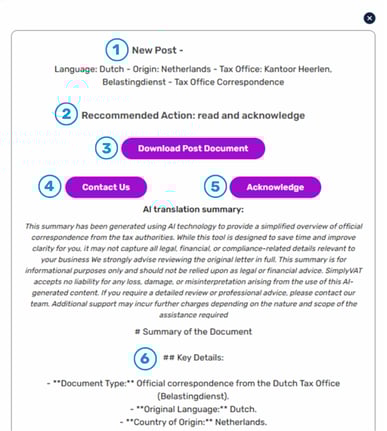
- Title and Tax Office: The title fo the correspondence and which Tax Office sent it to you
- Recommended Action: What we recommend you do with this piece of post
- Download the Original: This button allows you to download a PDF of the original document for your records
- Contact Us: Click this button to get in touch with us if you have any questions about your post
- Acknowledge Receipt: To complete the task, you’ll need to click this button to acknowledge that you’ve read and understood what you’ve been sent
- AI Translation: This summary has been generated using AI technology to provide a simplified overview of official correspondence from the tax authorities.
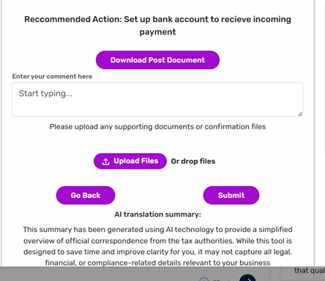
Once you’ve acknowledged a piece of mail, you can action anything you need to here by sending us your comments and supporting documents.
All your post is stored in My Cases, so if you need to access your mail later, you can find it archived alongside your Support Cases.
Please Note:
While the AI summary is designed to save time and improve clarity for you, it may not capture all legal, financial, or compliance-related details relevant to your business.
We strongly advise reviewing the original letter in full. This summary is for informational purposes only and should not be relied upon as legal or financial advice. SimplyVAT accepts no liability for any loss, damage, or misinterpretation arising from the use of this AI-generated content.
If you require a detailed review or professional advice, please contact our team. Additional support may incur further charges depending on the nature and scope of the assistance required.