.png?width=1075&height=150&name=Trustpilot%20Banner%20(8).png)
When you pay your first invoice by card, these details are stored by Stripe. Your future monthly subscription invoices will be charged to this card.
How to Change Your Payment Method
Change your payment method by logging on to your pre-configured Stripe Account, which you can access via the billing portal. The payment methods available are:
- Direct Debit (only for customers with a UK GBP bank account)
- SEPA Direct Debit (only for customers with a EURO bank account)
- ACH Direct Debit (only for customers with a USD bank account)
- Credit Card/Debit Card (any credit or debit card, in any currency, can be used)
How to Add Your Payment Method
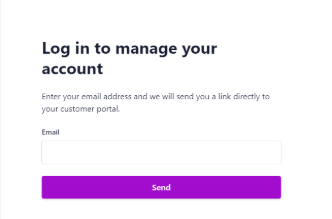
Updating payment methods, contact details and downloading copies of invoices can all be done via the billing portal. To access the billing portal, all you need is the email address to which your invoices are sent as your login. No password is required, as a one-time link will be sent to this email address.
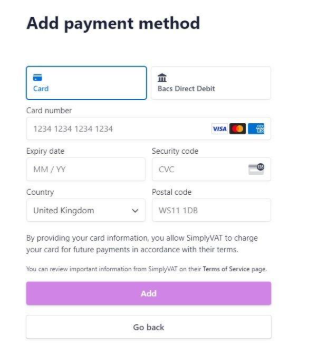
After you log in to the portal, you can add a payment method by clicking ‘+ add payment method’. If you already have a payment method set up, this button will be replaced with ‘+update payment method’.
Below the payment method section is the billing information. This will allow you to change your address, add your VAT number and add a contact number.
How to Download Your Invoice
Downloading copies of invoices can be done via the ‘Invoice History’ section. The invoices will be in date order, but you can also use the search bar to locate specific invoices. Clicking on the invoice will take you to a separate page where you can download and pay the invoice.
